Show control
The Show control panel guides you through the process of starting a drone show in precise consecutive steps.
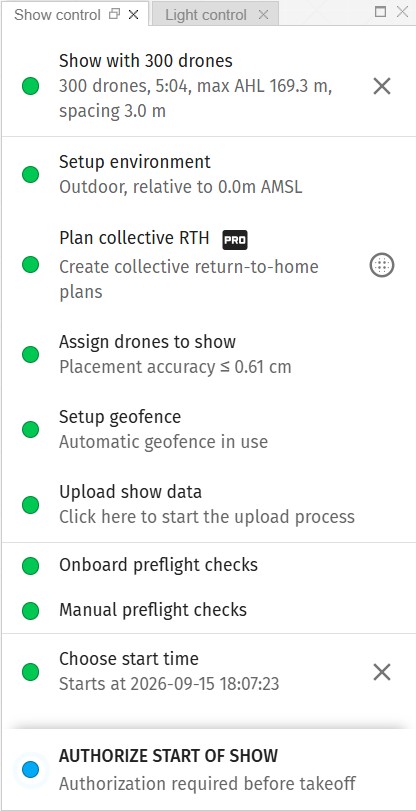
The color next to each step indicates its status. Go from top to bottom, follow the guidelines and turn everything green to succeed.
Please go over the Start a drone show in 10 steps with Skybrush Live tutorial to get familiar with the show control panel in depth.
The last step in the checklist before takeoff is the Authorize start of the show button. If you press this, the checklist changes to a control panel with big colored buttons.
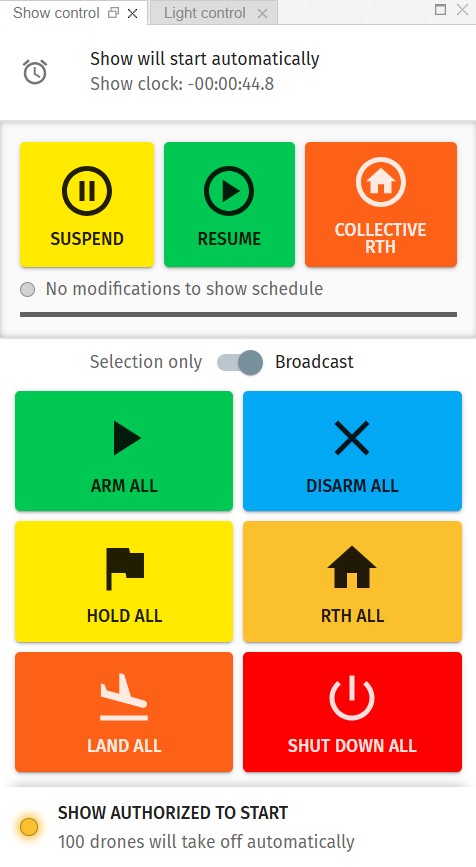
Collective commands (PRO)
Suspend, Resume and Collective RTH are collective commands, which means that they are handled by Skybrush Server at the fleet level, instructing all UAVs in a coordinated way.
Collective control commands are only available to users with an active license for Skybrush Live.
Actions triggered by collective control commands are divided into distinct phases. The progress bar below the collective control command buttons shows the current phase and the expected time remaining until the end of the phase.
Pressing collective control buttons first triggers a preparation phase, which is needed to inform all drones about the upcoming collective control procedure. The show continues without noticeable change in this phase. The length of this phase can be set up as a server configuration parameter, depending on your network infrastructure stability and experience.
The next phase for the Suspend and Collective RTH commands is slowdown. In this phase the drones slow the show timeline until they stop fully. This allows them to remain on their original show trajectories without collisions while they prepare for the upcoming commands. The length of this phase can also be changed as a server configuration parameter.
Instead of a slowdown, the Resume command continues with a similar speedup phase that restores normal show speed.
A special edge case is when you wish to trigger collective RTH from a suspended state. In this case, the show is typically resumed first and runs until the next available timestamp with a valid collective RTH plan before being suspended again.
Finally, the Collective RTH command has a final phase, the actual collective return to home. In this phase drones return to their home positions in a coordinated way, without collisions, and land automatically.
| The Collective RTH operation cannot be cancelled or suspended! After triggering it, all you need to do is wait until all drones land safely. If you need to stop a collective RTH operation, you can still change the flight mode to simple RTH or LAND, but it is your responsibility what you do with your drones. |
Individual commands
The second set of colored buttons corresponds to individual commands that are forwarded to the autopilot of the relevant UAVs to control them one by one independently, regardless of the state of other UAVs around.
With these buttons you can arm or disarm drones or interrupt the show with low-level return to home, land or halt (global kill switch) operations.
These commands are either broadcast to all drones on the network or sent to selected ones in a unicast manner, one by one, depending on the state of the toggle above the buttons.
| The proper handling of an emergency situation when a fleet of drones is in mid-air is very far from trivial. Get proper training and practice, be prepared to react with the optimal action or termination of action. Sacrificing a single drone, for example, is a better option than causing complete chaos with hundreds of other drones… All in all, use the ARM, DISARM, RTH, LAND and HALT buttons with care, only if you know exactly what you are doing, and think twice even in that case! |