UAV Status

The UAV Status widget shows you an overall summary of the states of the UAVs in the swarm. UAVs are sorted into five non-overlapping sets (followed by a total UAV count):
-
The first, green group corresponds to UAVs without any problem.
-
The second, blue group corresponds to UAVs with an info-level error code (e.g. initializing).
-
The third, yellow group corresponds to UAVs with a warning-level error code (e.g., low battery).
-
The fourth, magenta group corresponds to UAVs with no telemetry.
-
The fifth, red group corresponds to UAVs with severe/critical errors (e.g. GPS outage or compass error).
If you move your cursor over the widget, you get a tooltip that lists the physical IDs of all UAVs and the overall number of UAVs in a particular state, sorted by severity of states and error codes. Clicking on the widget itself reveals the UAVs panel of the main workbench area.
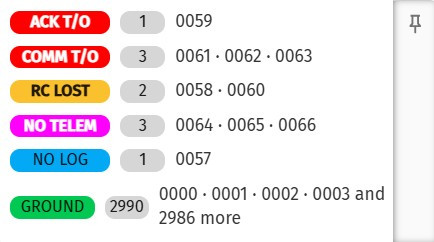
| Click on the pin icon in the top-right corner of the widget to display the tooltip content permanently in a separate panel in the workbench. |
The list of available error codes of all severity levels from informational messages to critical errors can be found in the public online Skybrush protocol specification.
| Clicking on a row in the tooltip selects all UAVs in the corresponding state. Clicking on the sum sign selects all UAVs. |