Skybrush Documentation Site
Back to main site

Skybrush Studio for Blender

    • Overview
    • Feature highlights
    • Installation
    • Key concepts
    • Tutorials
      • Quick guide to drone show design with Skybrush Studio
    • Tabs and panels
      • Skybrush tab
        • Setup panel
        • Show panel
        • Swarm panel
        • Drone groups
      • Formations tab
        • Formations panel
        • Storyboard panel
      • LEDs tab
        • LED Control panel
        • Light Effects panel
      • Pyro tab
        • Pyro Control panel
      • Safety & Export tab
        • Safety Check panel
        • Export panel
    • Advanced topics
      • Custom light effects
      • Custom output functions (legacy)
      • Custom output functions (new)
    • Appendix
      • Third party tools
      • Glossary
Skybrush Studio for Blender latest
  • Frequently Asked Questions
    • latest
  • Front page
    • latest
  • Skybrush firmware
    • latest
  • Skybrush Live
    • latest
    • 2.13.2
    • 2.12.1
    • 2.9.0
    • 2.8.1
    • 2.8.0
    • 2.7.1
    • 2.3.0
    • 2.2.0
    • 1.27.1
    • 1.25.0
    • 1.24.3
    • 1.21.0
  • Skybrush protocol specification
    • latest
  • Skybrush Server
    • latest
  • Skybrush Sidekick
    • latest
  • Skybrush Studio for Blender
    • latest
  • Skybrush Studio for Blender
  • Tabs and panels
  • LEDs tab

LEDs tab

The LEDs tab in the sidebar of the Viewport editor helps you to create light animation for your drone show.
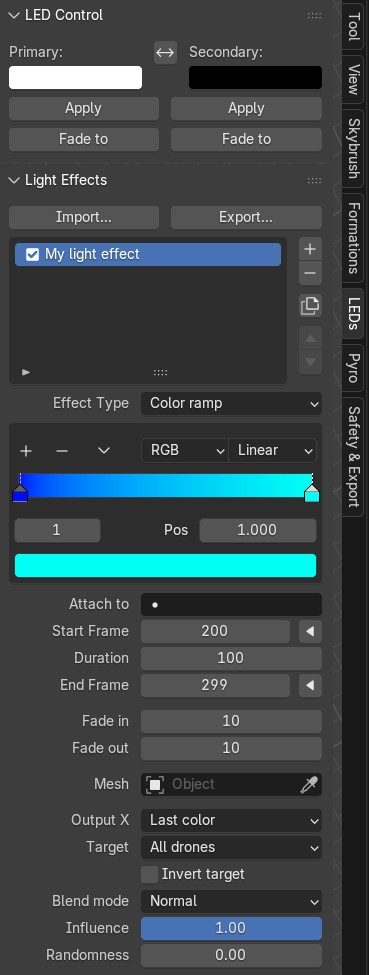
LEDs tab

The LEDs tab contains two panels:

  • LED Control panel

  • Light Effects panel

Storyboard panel LED Control panel