Drone Groups Panel
The Drone Groups panel lets you set up simple drone groups for later use with formations, light effects and for other general purposes.
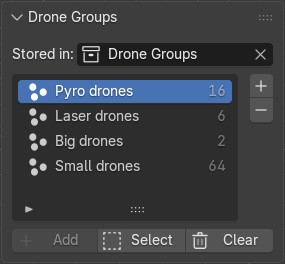
Drone collection
Drone groups consist of your drone objects separated into drone group collections.
Click on the Drone group collection dropdown to select the collection that is your primary source of your drone group lists. By default you do not have to change this setting, the Create Takeoff Grid button below will create a "Drone Groups" collection and set it as your primary source automatically.
| Any sub-collection placed in the collection selected here will be treated as a drone group by Skybrush Studio. Make sure that there are no other objects in these groups than the ones that you want to consider drones. |
Creating, renaming and deleting drone groups
Press the + button on the right of the panel to add a new drone group to the list of groups. Double click on it to set a custom name for your new group. Press the - button to remove the selected group from the list.
Alternatively, you can use Blender’s standard tools in the Outliner editor to modify your Drone Groups collections and its contents.
Operations with drone groups
The list of drone groups shows you the names and the number of drones in all groups. Select one group from the list to perform operations with it.
Add
Press the Add button on the bottom of the panel to add the currently selected drones to the given drone group.