Selection groups

The Selection groups widget shows you the number of selected objects and lets you create and recall user-defined groups of selected object.
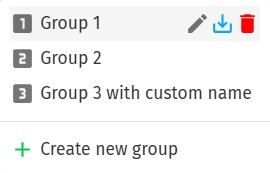
If you move your cursor over the widget, you get a tooltip that also shows the number of selected objects, lists the available selection groups and provides an additional Create new group button to create a new group from the current selection.
| Click on the pin icon in the top-right corner of the widget to display the tooltip content permanently in a separate panel in the workbench. |
On each group listed in the tooltip you find three buttons on the right:
-
one for editing group properties, such as its name,
-
one for updating the group to the current selection,
-
one for deleting the group.
An additional hotkey is also shown for each group on the left that can be recalled by typing g1, g2 etc. for each group, correspondingly.